
Payment guide
How to Pay Through Card Payment (Computer Only)
If you don’t have a PayPal account, you can still pay using your credit or debit card. Just follow these steps on a computer:
Step-by-Step Instructions
1.Go to Checkout
On the product page, click the “Pay with PayPal” button.
2.Wait for the PayPal window to load
You’ll be redirected to PayPal’s secure payment page.
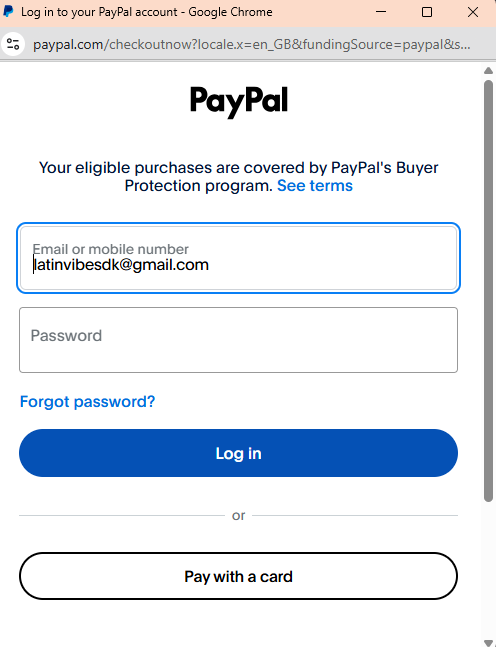
3.Select “Pay with Debit or Credit Card”
Look for the option that says “Pay with a card” or “Continue as Guest”.
This option allows you to pay without logging into PayPal.
4. Fill in your payment details
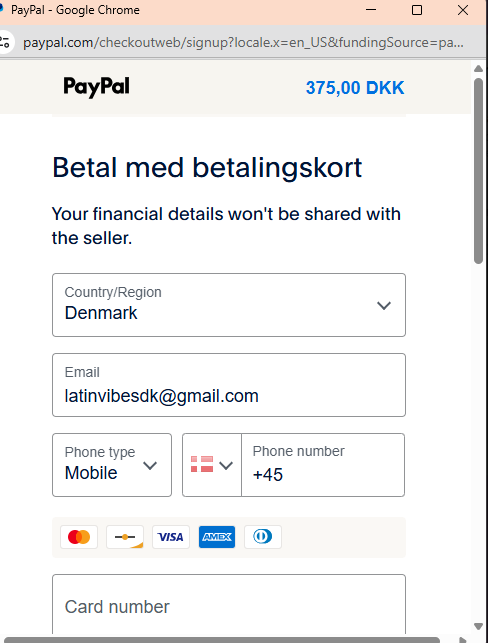
Enter your email, phone number, and card information.
Make sure the country is set to Denmark (or your correct location).
5. Confirm your billing and shipping info
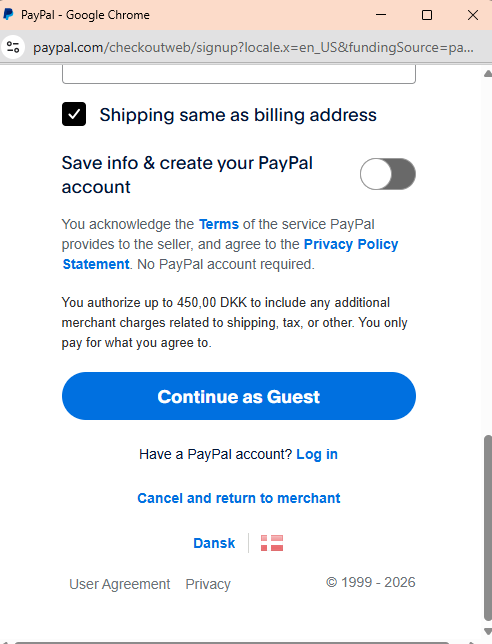
Check the box that says “Shipping same as billing address” if applicable.
6. Skip creating a PayPal account
Leave the toggle off for “Save info & create your PayPal account.”
7. Click “Continue as Guest”
This will take you to the final payment screen.
8. Complete your payment
Review the total amount and click to confirm your purchase.
Important Notes
You’ll be paying through PayPal, but you don’t need a PayPal account.
This method only works on a computer, it may not show up correctly on mobile devices.
You’ll receive a confirmation email once your payment is successful.